
readabler
Sign inScan free
For people, not websites

Make every website readable — for you

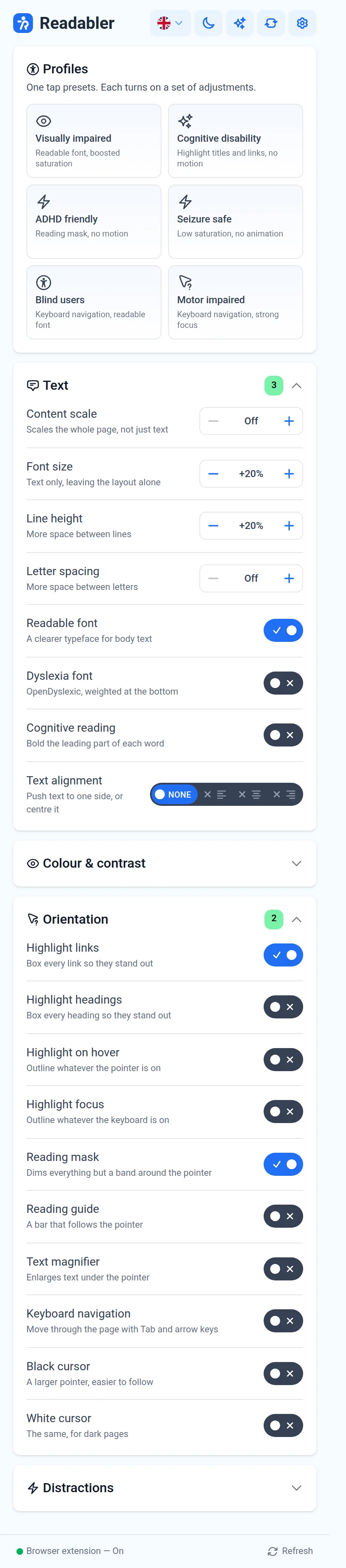
The Readabler panel in your browser: fonts, colors, contrast, spacing and reading aids on any site you visit, plus the AI assistant.

You’re using Chrome on macOS — Readabler is ready for it

Add to Chrome (opens in a new tab)via Chrome Web Store · 1 day free, then $19/month
Not your browser?
Extension panel
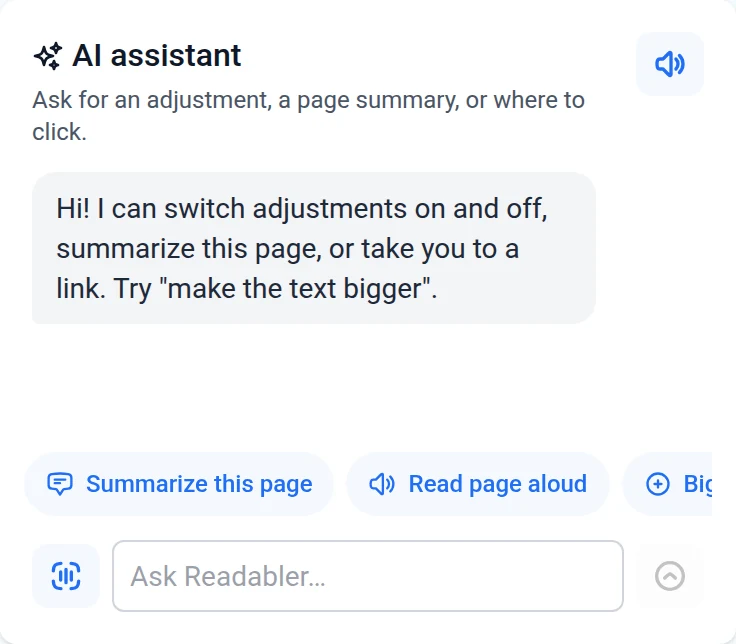
AI assistant in the extension

One extension, five browsers

The same panel and the same account everywhere. Your subscription works in every browser you install it in.

Install in Chrome in under a minute

Steps change with the browser you pick above.
  1. Add it from the Chrome Web StoreClick “Add to Chrome”, then “Add extension”.
  2. Sign in to ReadablerOpen the panel and sign in with your Readabler account — the 1-day trial starts. Signing in once is enough.
  3. Keep it at handPin Readabler: puzzle icon in the toolbar → pin. Then open the panel on any page.

Everything you need, on every site

See all features

Six profiles

Visually impaired, cognitive, ADHD friendly, seizure safe, blind users, motor impaired.

Text

Content scale, font size, line height, letter spacing, readable font, OpenDyslexic, cognitive reading.

Colour & contrast

Dark, light, high contrast, monochrome, saturation; text, heading and background colors.

Orientation

Highlight links, headings, hover and focus; reading mask and guide; text magnifier; big cursors.

Fewer distractions

Stop animations, hide images and emoji, mute sounds.

AI assistant

Ask in your own words: describe an image, summarize a page, read it aloud or switch a setting for you.

Your settings follow you

Set things up once and every website opens the way you need it. When one site needs something different, keep a separate copy of the settings just for it.

Every websiteLarger text, a calmer palette or a reading mask on every page you open — no setup per site.
One website, its own settingsA dark news site, a pale web shop? Override the settings for that site only.

Try it free for a day

Cancel any time before the trial ends and you will not be charged.

Browser extension1 day free
$19/month
  • Every adjustment and all six profiles
  • The AI assistant
  • Every website you visit, in every browser you sign in to
Add to Chrome (opens in a new tab)

Own a website? The extension is for you as a visitor. To add the Readabler widget, site audits and AI fixes for your visitors, see the website plans — they start free and are billed separately from the extension.

Questions

Which browser should I pick?

The one you use every day. This page detects it and links to its store; Chromium browsers such as Brave or Vivaldi install from the Chrome Web Store.

Can I use one subscription in several browsers?

Yes. Install the extension in each browser and sign in with the same Readabler account.

Is the extension included in my website plan?

No. A website plan puts the Readabler widget on your site for your visitors; the extension applies the same adjustments to every site you personally visit. They are billed separately.

When will Safari and Opera be available?

Both are in the works. Leave your email with “Tell me when it’s ready” and we will write once they are in the stores.

What happens after the free day?

The subscription continues at $19 a month. Cancel before the trial ends and you will not be charged.

Waiting for Safari or Opera?

We will send one email when Readabler is in their stores.

More from the Readabler universe